

Preliminary
To receive these webhooks, you will need a POST endpoint on your server that can be called by our system to send you webhooks.
Setting Up Webhooks
To enable webhooks, please follow the steps below:
Step 1
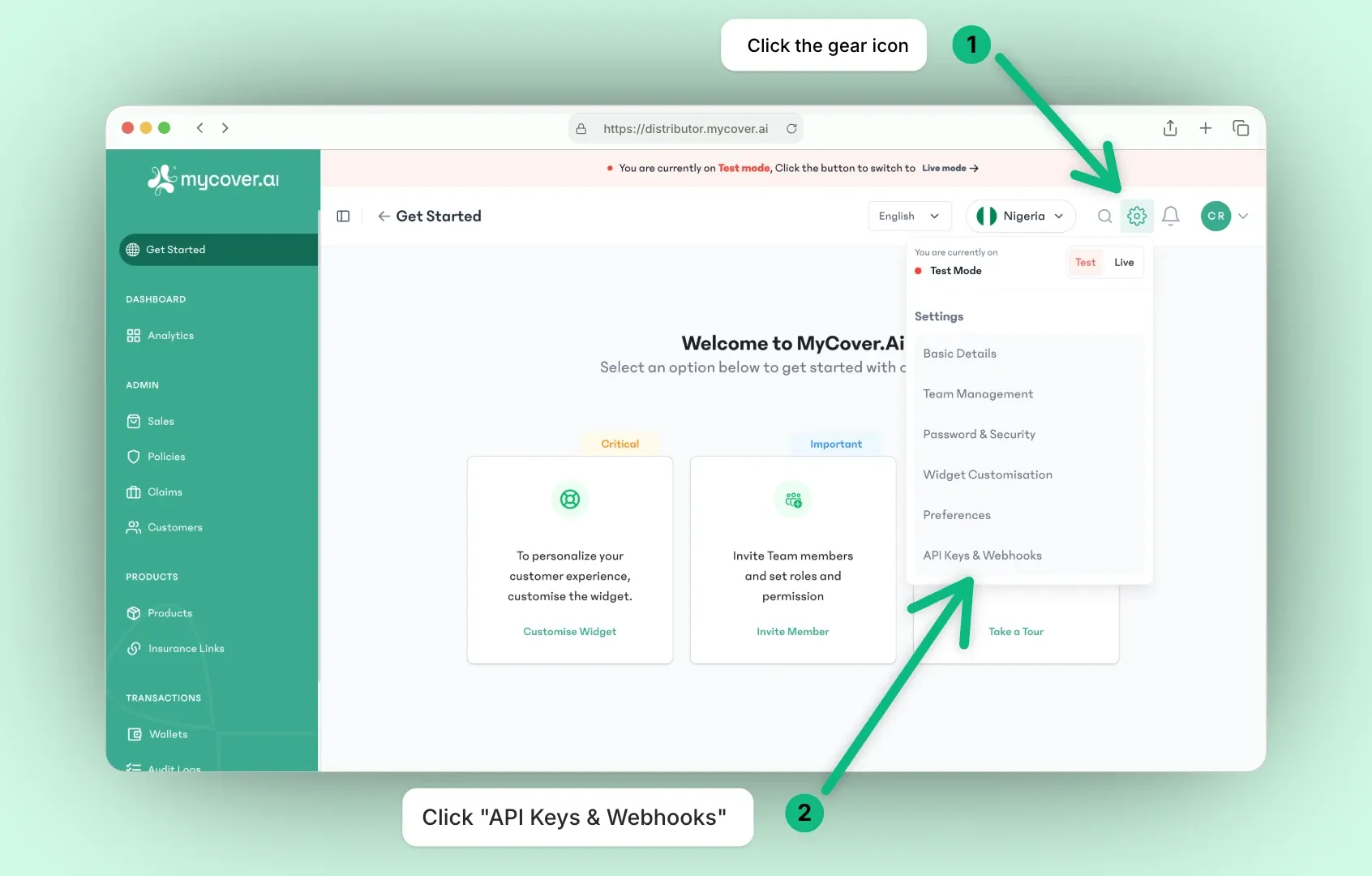
Log in to your Distributor dashboard. Then, click on the settings icon to navigate to the settings page.
Step 2
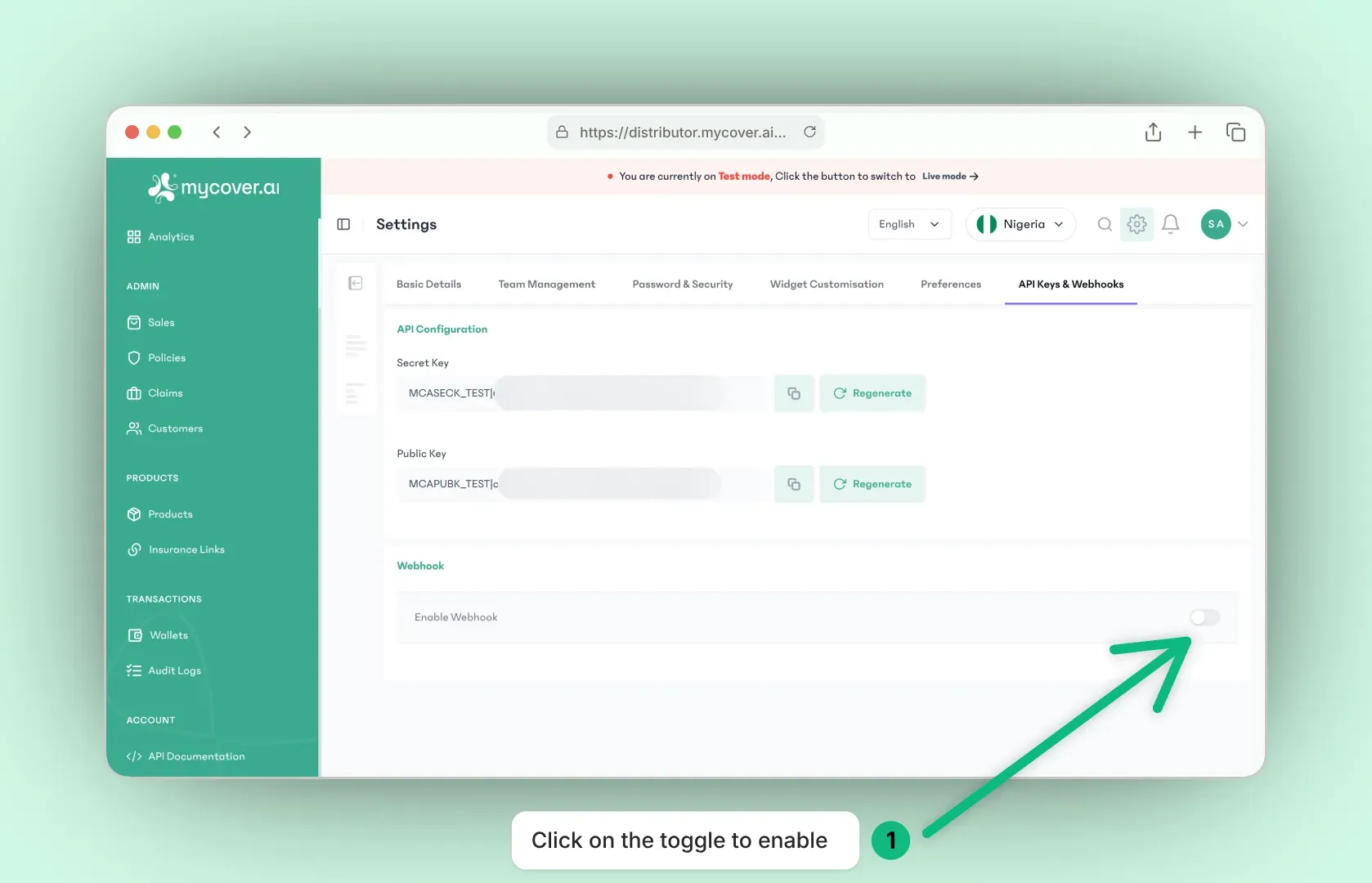
At the bottom, you will find the webhook section. Click on the toggle to enable webhooks.
Step 3
Once webhooks are enabled, a form will appear where you can enter your webhook URL. This URL is the endpoint on your server that will receive the webhook notifications from our system. After entering the URL, click on the "Save" button to save your webhook URL.
|. E.g https://example.com/webhook|https://example.com/webhook2. Each will receive a copy of every webhook.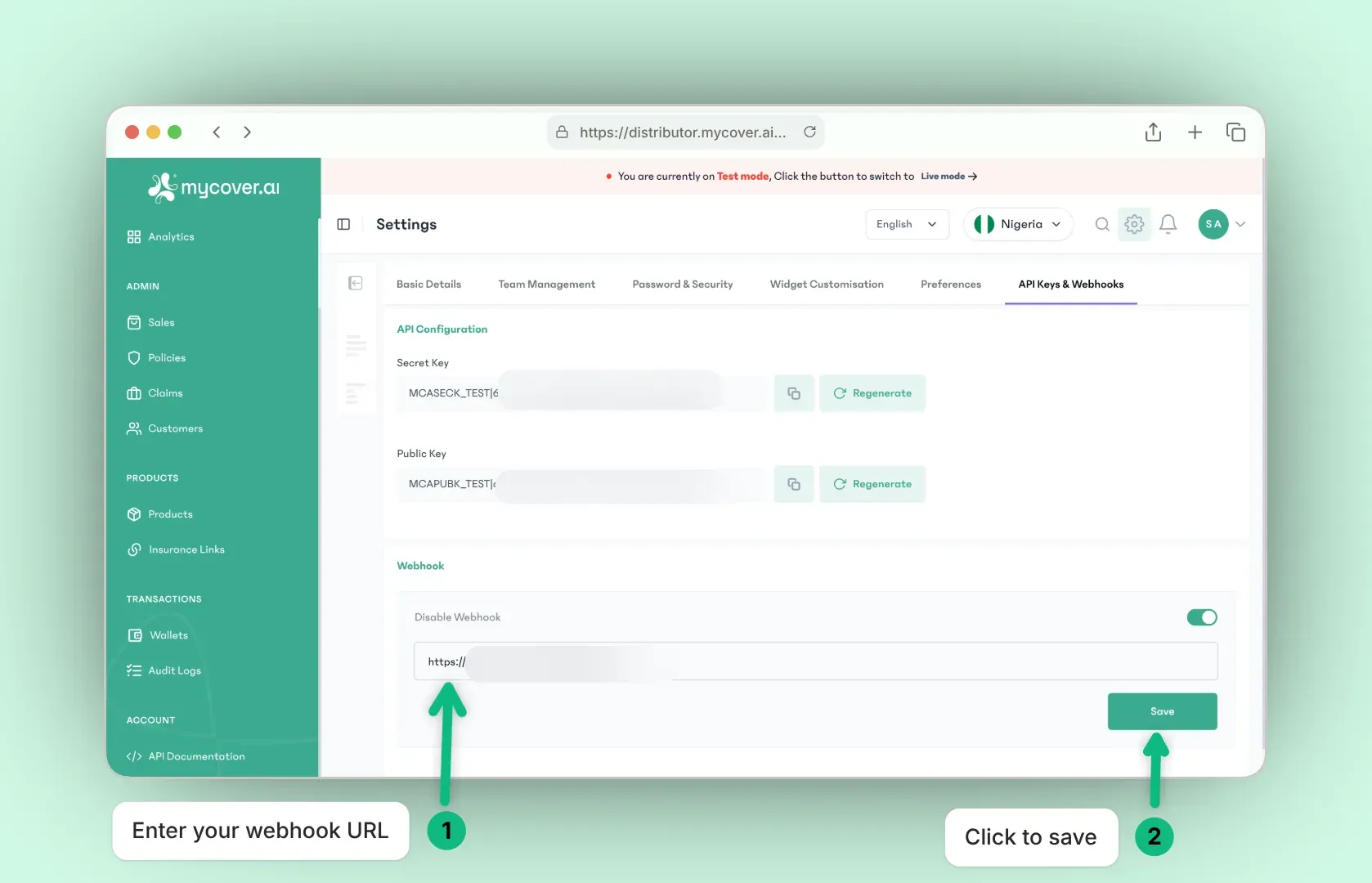
Validation
You can effortlessly verify webhooks received from the MyCover.ai platform by following these steps:
Signature Inclusion: Every sent webhook includes a signature in the headers called x-mycoverai-signature. This signature is the encrypted webhook data using the merchant's (i.e Distributor) private secret API key.
Validation on Merchant's End: Merchants can follow the same encryption steps using their secret API key. Then, they can compare the created signature with the one they received. If the signatures are the same, it's safe to go ahead and use the webhook information. However, if the signatures don't match, they should ignore the webhook and not use the information it carries.
const crypto = require("crypto");

const secretKey = 'MCASECK|<uuid>';

const signature = crypto
  .createHmac("sha512", secretKey)
  .update(JSON.stringify(req.body))
  .digest("hex");

if (req.headers['x-mycoverai-signature'] === signature) {
      const event = req.body;
      // Do something with event - that will not take long

      // Return Ok
      res.send(200);
}
import json
import hashlib
import hmac

secret_key = 'MCASECK|<uuid>'

json_payload = json.dumps(req_body, separators=(',', ':'))

secret_key_bytes = secret_key.encode()

hmac_obj = hmac.new(secret_key_bytes, digestmod=hashlib.sha512)

hmac_obj.update(json_payload.encode())

signature = hmac_obj.hexdigest()

if req.headers.get('x-mycoverai-signature') == signature:
    print('Do something with req_body')
    # Return Ok
Retry Logic
Webhook delivery is retried automatically on failure. We consider a delivery failed if your endpoint returns a non-2xx HTTP status or does not respond within 60 seconds.
We retry up to 10 additional times using exponential backoff:
| Attempt | Delay | Cumulative time elapsed |
|---|---|---|
| 1 | 30 seconds | 30 seconds |
| 2 | 1 minute | 1 minute 30 seconds |
| 3 | 2 minutes | 3 minutes 30 seconds |
| 4 | 4 minutes | 7 minutes 30 seconds |
| 5 | 8 minutes | 15 minutes 30 seconds |
| 6 | 16 minutes | 31 minutes 30 seconds |
| 7 | 32 minutes | 63 minutes 30 seconds |
| 8 | 64 minutes | 2 hours 7 minutes 30 seconds |
| 9 | ~2.1 hours | ~4 hours 13 minutes |
| 10 | ~4.3 hours | ~8 hours 31 minutes |
Idempotency
Because webhooks can be retried up to 10 times, your endpoint may receive the same event more than once. This can happen not just from retries, but also from transient network issues or rare cases where your server processes a request but fails to return a response in time.
Design your endpoint to be idempotent so that processing the same event multiple times produces the same result as processing it once.
Using the event ID
Every webhook payload includes a unique event_id field. Use it to deduplicate incoming events:
- When an event arrives, check your data store for the
event_id. - If it already exists, return a
200 OKand discard the payload. - If it is new, process the event and persist the
event_idbefore returning200 OK.
{
  "event_id": "C6HdCeTS_7L6GOmlIS1kD",
  "event": "purchase.successful",
  "status": "processed",
  "data": { ... }
}
Webhook Payload Structure
Every webhook we send shares a common envelope structure, regardless of the event type. Understanding this structure lets you write a single parsing layer that handles all webhook events consistently.
interface IWebhookPayload {
  event_id: string;
  event: string;
  status: "processed" | "failed";
  data: IWebhookData;
}
Top-level payload
| Field | Type | Description |
|---|---|---|
event_id | string | Unique identifier for this event. Use this to deduplicate retried deliveries. |
event | string | The event type that triggered this webhook, e.g. purchase.successful. |
status | "processed" | "failed" | Whether the operation completed successfully or encountered an error. |
data | IWebhookData | The event payload. See below. |
Data object
interface IWebhookData {
  essential: { [key: string]: any };
  created_at: string;
  updated_at: string;
  meta?: { [key: string]: any };
  sdk?: { [key: string]: any };
}
| Field | Type | Description |
|---|---|---|
essential | object | Core fields guaranteed to be present for this event type - customer details, policy identifiers, amounts, and so on. The specific keys vary by event. |
created_at | string | ISO 8601 timestamp of when the resource was created. |
updated_at | string | ISO 8601 timestamp of when the resource was last updated. |
meta | object (optional) | Additional context about the resource, such as policy limits or supplementary identifiers. Present on most events but not guaranteed. |
sdk | object (optional) | Data relevant to SDK-initiated flows, including configurations and any generated links (e.g. claim or inspection URLs). Used to initialize MCA SDK with a specific action. Present on most events but not guaranteed. |
Example payload
Here is a full example for a purchase.successful event:
{
  "event_id": "C6HdCeTS_7L6GOmlIS1kD",
  "event": "purchase.successful",
  "status": "processed",
  "data": {
    "essential": {
      "first_name": "Jimmy",
      "last_name": "Kardi",
      "email": "[email protected]",
      "phone_number": "2349102345678",
      "customer_id": "908d7572-726c-4467-a613-2d3a1478c17d",
      "policy_id": "26f6dd66-c300-4314-8c81-b0dfe4f6e3fe",
      "policy_number": "TESTACC/AR/05/2026/HQ/2430",
      "product_id": "eec0711c-1e4a-453b-a26c-2726e0a1a7cc",
      "amount": "25000.0000",
      "expiration_date": "2027-05-21T00:00:00.000Z"
    },
    "meta": {
      "sum_insured": 500000,
      "policy_number": "TESTACC/AR/05/2026/HQ/2439"
    },
    "sdk": {
      "config": {
        "pk": "YOUR_PUBLIC_KEY",
        "pid": "eec0711c-1e4a-453b-a26c-2726e0a1a7cc",
        ...
       },
      "claim_link": "https://...",
      "inspection_link": "https://..."
    },
    "created_at": "2026-05-21T21:49:06.551Z",
    "updated_at": "2026-05-21T21:49:11.843Z"
  }
}